Beruni vs ScoutSuite: which AWS security tool fits your team
ScoutSuite is the free Python CLI for one-off AWS audits. Beruni is the hosted, compliance-mapped scan built for SOC 2 and PCI evidence. How to choose.
Quick answer: ScoutSuite is an open-source, multi-cloud security auditing CLI from NCC Group. You run it locally, it generates a static HTML report, and the operational work (scheduling, triage, framework mapping, multi-account rollup, audit evidence) is on you. Beruni is a hosted AWS-only scanner: deploy one CloudFormation role, get findings mapped to CIS, FSBP, PCI DSS, and GDPR controls, ranked by a context risk score, and connected into attack paths, on a schedule. Pick ScoutSuite if you want a one-off audit and have the engineer time. Pick Beruni if you're heading into a compliance audit, or you want findings ranked by what is actually reachable instead of a flat severity list.
ScoutSuite's been around for years and it's genuinely good at what it does. It's a defensible choice for security consultancies running point-in-time audits, for an engineer who wants to see the shape of a fresh AWS account before committing to a vendor, and for any team that prefers tools they can read end to end. The two tools were built for different jobs, and the right choice depends almost entirely on which job you have.
Key takeaways
- ScoutSuite is a CLI. Install Python, configure AWS credentials, run a command, open an HTML file. Every run is a manual act.
- Beruni is a hosted service. Deploy a CloudFormation template once. The scan runs daily against a read-only role pinned by an
ExternalId. - ScoutSuite is multi-cloud (AWS, Azure, GCP, Alibaba Cloud, Oracle Cloud). Beruni is AWS-only and intentionally narrower: IAM, S3, EC2, VPC, RDS.
- Multi-framework compliance mapping. ScoutSuite can run a CIS benchmark ruleset and show CIS references, one framework at a time. Beruni tags every finding with CIS AWS Foundations, AWS FSBP, PCI DSS, and GDPR control IDs at once, by default.
- Beruni is context-driven, not context-free. Every scan builds a reachability and identity graph and scores each finding 0-100 on whether it is internet-reachable and whether an identity chain reaches sensitive data. ScoutSuite reports each misconfiguration in isolation; Beruni weighs it in context.
- Attack paths, not just findings. Beruni surfaces the toxic paths (an internet-exposed resource that can reach a sensitive store) above the queue, and produces reachability findings a flat scanner cannot express. ScoutSuite has no equivalent.
- ScoutSuite is free forever. Beruni is free during beta; pricing lands before GA.
- The real question isn't features. It's who owns the operational burden of running a scan every week, triaging the same finding twice, and producing evidence an auditor will accept.
What the two tools look like in practice
A ScoutSuite run is a single command, repeated whenever you want fresh data:
pip install scoutsuite
aws configure                          # set up read-only IAM credentials
scout aws --report-dir ./report        # walk the account
open ./report/scoutsuite-report-aws-*.html
You get an HTML dashboard on your laptop. Severity, service, finding name. Useful, portable, and entirely yours to operationalize.
A Beruni finding looks like this:
{
  "rule_id": "S3-001",
  "service": "S3",
  "resource_type": "AWS::S3::Bucket",
  "resource_external_id": "arn:aws:s3:::acme-prod-uploads",
  "region": "us-east-1",
  "title": "S3 Bucket Allows Public Read Access",
  "severity": "CRITICAL",
  "status": "open",
  "risk_score": 92,
  "compliance": [
    { "framework": "CIS_AWS_v3.0.0", "control_id": "2.1.1",      "control_title": "Ensure S3 Bucket Policy is set to deny HTTP requests" },
    { "framework": "AWS_FSBP",       "control_id": "S3.1",       "control_title": "S3 Block Public Access setting should be enabled" },
    { "framework": "PCI_DSS_v4.0",   "control_id": "1.4.4",      "control_title": "Cardholder data is not directly accessible from untrusted networks" },
    { "framework": "GDPR",           "control_id": "Article 32", "control_title": "Security of processing" }
  ],
  "detected_at": "2026-06-18T08:14:03Z"
}
And in the console, each finding opens as a full workspace:
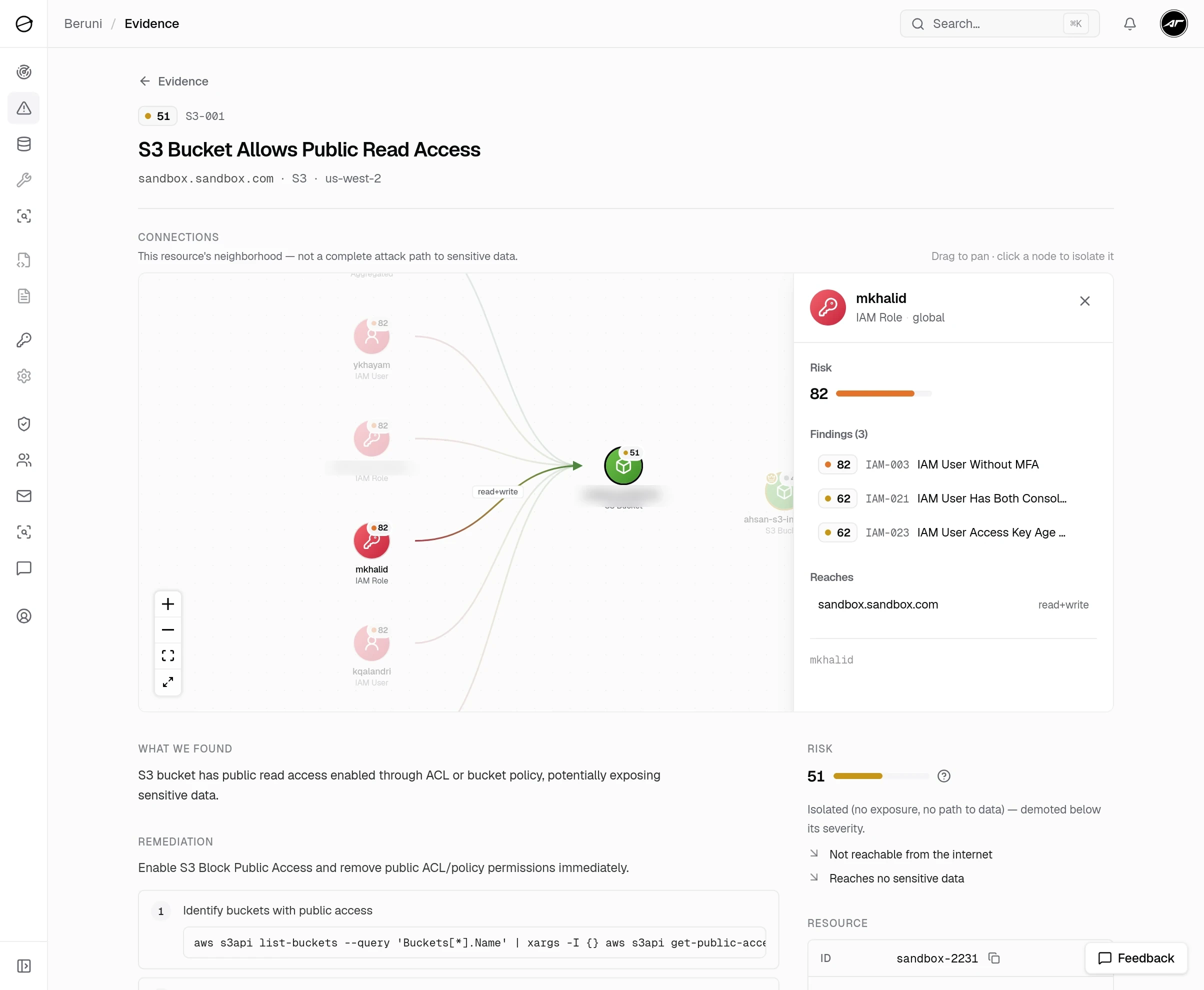
That compliance array is the difference an auditor cares about, and the risk_score is the difference a triage queue cares about. Everything else in this post is downstream of those two fields.
The honest comparison
The shortest version of the difference, dimension by dimension.
- Deployment model. ScoutSuite: local Python CLI you run on a laptop or a CI runner. Beruni: hosted SaaS with a scoped read-only role in your account.
- Authentication. ScoutSuite: your IAM user or assumed role, configured on the machine that runs the scan. Beruni: one CloudFormation template that creates a role using the
SecurityAuditmanaged policy, with trust pinned by anExternalId. - Clouds covered. ScoutSuite: AWS, Azure, GCP, Alibaba Cloud, Oracle Cloud, partial Kubernetes. Beruni: AWS only.
- AWS service depth. ScoutSuite: broad across most major services. Beruni: deep on five (IAM, S3, EC2, VPC, RDS).
- Output. ScoutSuite: a static HTML report on the laptop that ran it. Beruni: a findings table in a web console, searchable and filterable.
- Compliance mapping. ScoutSuite: optional CIS benchmark rulesets, one framework at a time, with CIS references in the HTML report. Beruni: CIS, FSBP, PCI DSS, and GDPR control IDs on every finding, by default.
- Audit evidence. ScoutSuite: attach the HTML, map findings to controls yourself. Beruni: per-control evidence already structured for SOC 2, PCI, and ISO.
- Attack-path analysis. ScoutSuite: none. Beruni: a per-scan reachability and identity graph, with toxic paths (internet to a sensitive resource) pinned above the queue.
- Risk prioritization. ScoutSuite: static severity per finding. Beruni: a 0-100 context risk score that demotes unreachable findings and floats the exploitable ones.
- Continuous monitoring. ScoutSuite: you write the cron job. Beruni: daily scans by default, with change detection between runs.
- Multi-account view. ScoutSuite: one report per account; you stitch them. Beruni: one console across every connected account.
- Triage workflow. ScoutSuite: re-run, re-open the HTML, re-compare. Beruni: resolve or acknowledge inline; status persists between scans.
- Cost. ScoutSuite: free and open source. Beruni: free during beta; pricing lands before GA.
- Who runs it. ScoutSuite: you. Beruni: we run the scan; you read the findings.
That's the whole story. The next sections expand the two columns into the situations they fit.
When ScoutSuite is the right call
You're running a one-off audit for a client. This is what ScoutSuite was originally built for: a security consultant lands in a new AWS account, runs a single scan, ships a static HTML report as the deliverable, and moves on. There's no continuous obligation, no triage workflow, no second visit a month later. ScoutSuite fits this shape almost perfectly.
Your team is multi-cloud and wants one tool. Beruni is AWS-only and likely will be for a long while. If your stack spans AWS plus Azure plus GCP and you want one scanner across all of them, ScoutSuite is the obvious answer. The tradeoff is breadth at the cost of depth: one tool covering five clouds won't be the best tool for any of them.
You're tooling-curious and want to read the rules. ScoutSuite is open source. You can fork it, modify a check, or add a new finding type. (For what it's worth, Beruni's rule library is also open: every check is a JSON file in our repository. You can see the exact JMESPath conditions on the landing page under "Open by design.")
You have a security engineer with time to spare. ScoutSuite shifts the operational work onto you: install Python, manage credentials, schedule runs, store reports somewhere your team can find them, write the diff tool that compares last week's report to this week's. None of it is hard. All of it takes hours that compound. If you have an engineer whose job it is to do that work, ScoutSuite is free and capable.
When Beruni is the right call
You're heading into a compliance audit. SOC 2, PCI DSS, ISO 27001, or HIPAA. The auditor isn't asking "do you scan your cloud?" They're asking "show me, for control CC6.6, the evidence that your S3 buckets aren't publicly accessible." ScoutSuite's HTML report can be attached, but you have to read each finding and map it to a control yourself. Beruni does the mapping at the source. Every finding ships with the CIS AWS Foundations control number (2.1.1 for a public S3 bucket), the AWS FSBP ID (S3.1), the PCI DSS v4.0 control (1.4.4 for that same finding), and GDPR Article 32 on the rules that govern public exposure and encryption. The next section walks through what that looks like in practice.
You want to know which findings can actually hurt you. Beruni scores every finding 0 to 100 on real exposure, not just severity, and builds a reachability graph each scan. A critical-severity finding on a resource nothing can reach drops down the queue; a medium-severity finding that sits on a path from the internet to your database rises to the top. The console pins those toxic paths (internet-exposed resource, identity hop, sensitive store) above the findings list. ScoutSuite gives you a flat severity list and leaves the "which of these is reachable" analysis to you.
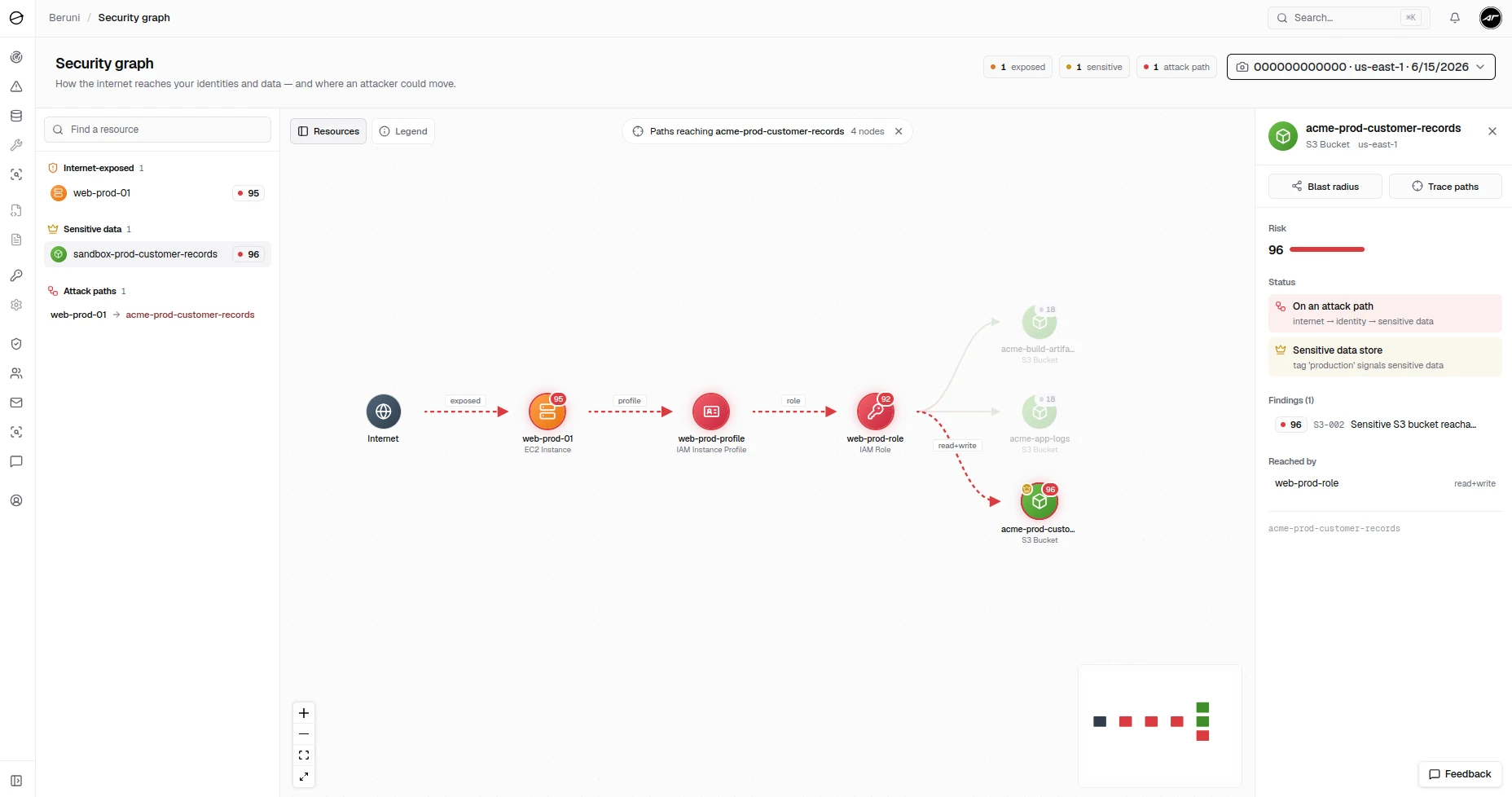
That finding, S3-002 "Sensitive S3 bucket reachable from an internet-exposed instance," is one a flat scanner can't even express. ScoutSuite can tell you the bucket holds sensitive data, the instance is public, and the role is over-permissioned, as three separate findings. It can't tell you they form a single path from the internet to your customer data, because it has no graph to walk.
You want the scan to run without anyone remembering to run it. Beruni runs daily by default (cadence configurable during onboarding). Findings persist between runs. If the same misconfiguration appears Monday and you resolve it Tuesday, it doesn't reappear Wednesday as a fresh finding. Status carries forward. This is the single largest workflow difference between a CLI and a hosted scanner.
You want a real audit trail across multiple AWS accounts. Most SaaS startups have at least three AWS accounts (prod, staging, sandbox), and the interesting findings are the ones that appear in prod but not staging. ScoutSuite runs one account at a time. Beruni connects each account once and surfaces findings across all of them in one console, with the account as a filter.
You want manual onboarding, not a Discord queue. Beta-specific. Two engineers walk every new customer through the CloudFormation step on a call. If something fails (a role policy permission you didn't have, a region we missed), we fix it that day.
You want to fix findings, not just see them. Beruni's finding detail panel includes the framework controls it violates, the risk context (a 0-100 score and the attack path the resource sits on), and the AWS CLI commands to close it. ScoutSuite gives you the finding. The remediation knowledge is yours to bring.
Compliance evidence: what your auditor actually wants
This is the single point most "vs" articles skip, and it's the one that decides which tool you should be running if you're inside a twelve-month audit window.
A SOC 2 Type II auditor isn't reviewing a tool. They're reviewing control evidence over a period. For an AWS-heavy startup, the controls most often tested map to specific cloud configurations. Here are five asks an auditor will make, the controls behind each one, and the evidence shape they expect:
- "Prove no publicly accessible S3 buckets contain customer data." Controls: SOC 2 CC6.1, CC6.6 · PCI DSS 1.4.4 · CIS 2.1.1. Evidence shape: a dated list of S3 buckets with their public-access state, across the audit window.
- "Prove all production databases enforce encryption at rest." Controls: SOC 2 CC6.7 · PCI DSS 3.5.1 · CIS 2.3.1. Evidence shape: per-instance encryption status, with a remediation log for anything that flipped during the window.
- "Prove IAM roles follow least privilege." Controls: SOC 2 CC6.3 · CIS 1.16. Evidence shape: roles flagged for wildcard actions, with timestamps for when each was fixed.
- "Prove SSH isn't open to the internet." Controls: SOC 2 CC6.6 · CIS 5.2. Evidence shape: security-group inventory showing every
0.0.0.0/0ingress rule flagged and remediated. - "Prove your cloud is monitored continuously, not point-in-time." Controls: SOC 2 CC7.1, CC7.2. Evidence shape: scan run history showing recurring scans, not one-off snapshots.
ScoutSuite can answer most of these, but the work of doing the mapping (and proving the continuous part) lands on the engineer assembling the evidence binder. Beruni's findings already carry the control IDs and the scan history. In practice this means screenshots and exports from the console are the evidence, no translation step required.
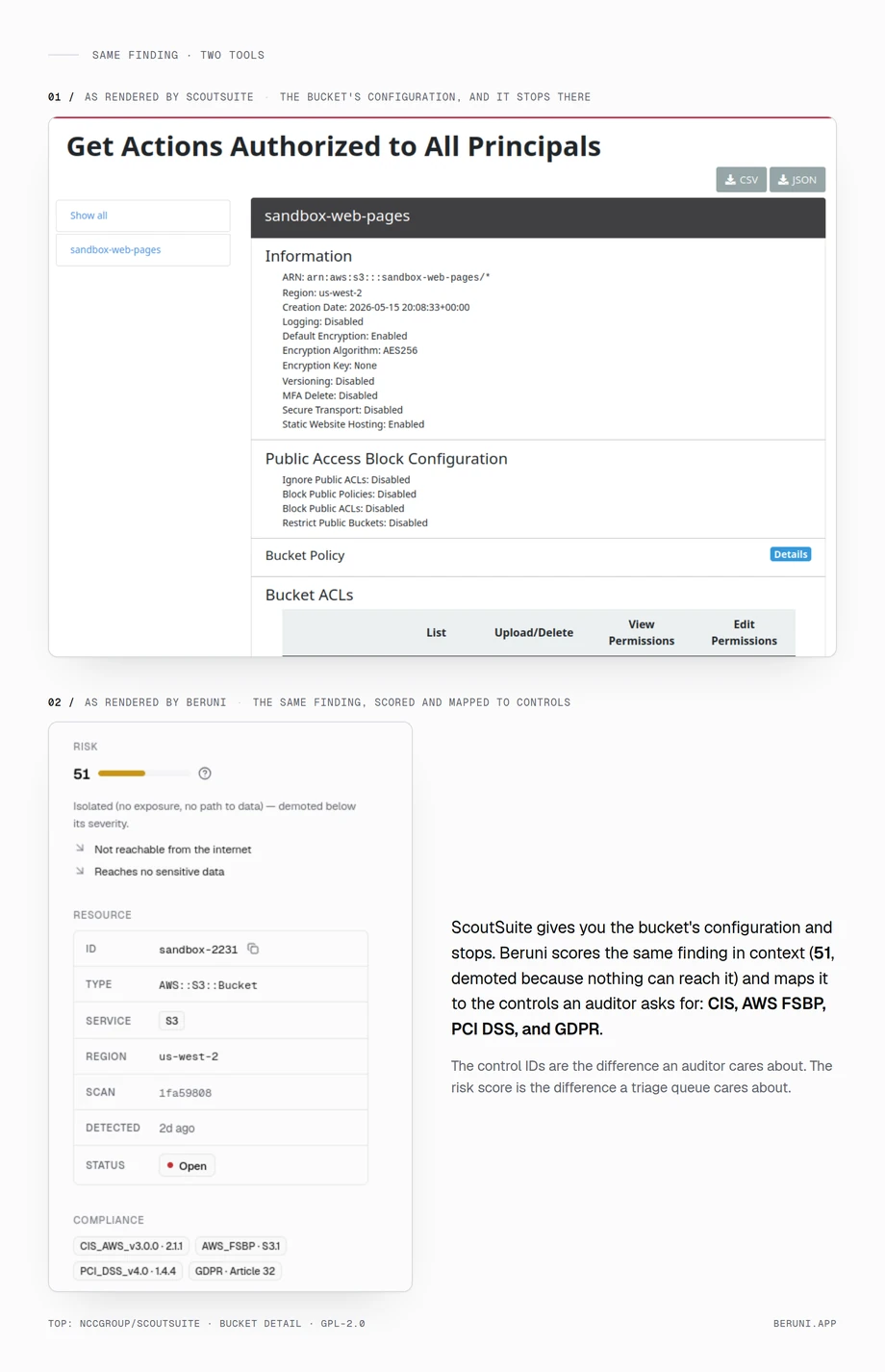
If you're auditing now, this is the dimension that matters most. If you're not, it's a feature you don't yet need.
Can you use both?
Yes. The teams getting the most from this combination use ScoutSuite for one-off baseline audits (a new account, an acquisition, a vendor environment they're reviewing) and Beruni for the production accounts they own day to day.
ScoutSuite is also a reasonable due-diligence check before committing to any CSPM tool. Running it locally for thirty minutes against an account you've never scanned is a no-commitment way to see the rough size of the problem. If the report comes back with hundreds of findings (it usually does), that's your signal to set up something that runs more than once.
What Beruni doesn't do
- Anything outside AWS. No Azure, no GCP, no SaaS apps.
- Services beyond IAM, S3, EC2, VPC, RDS. More are on the roadmap, prioritized by beta-customer ask.
- Runtime threat detection. Beruni inspects configuration, not workload behavior. For runtime, AWS GuardDuty is the natural counterpart.
- Agent-based scanning. Beruni is agentless and read-only by design. Nothing gets deployed inside your VPC.
- Code or container scanning. Static analysis of application code and container images is a different category; Trivy or your CI's built-in scanning covers that surface.
If your need is in any of those buckets, ScoutSuite won't cover it either, and you should look at a different tool.
What ScoutSuite doesn't do (that Beruni does)
- Continuous scheduled scans with persistent finding state.
- Multi-framework control IDs on every finding, by default. ScoutSuite can show CIS references in its CIS ruleset, but not CIS, FSBP, PCI, and GDPR together on every finding without switching rulesets.
- Attack-path analysis. A reachability and identity graph that shows which findings chain into a real path from the internet to a sensitive resource.
- Context risk scoring. A 0-100 score per finding that down-ranks anything unreachable, so you triage the exploitable issues first.
- A multi-account console without scripting it yourself.
- Inline remediation commands beside each finding, not a separate documentation lookup.
- Hosted infrastructure. You don't run anything. The scan executes from our AWS account, calls in with
sts:AssumeRole, and writes findings to the console.
How to decide
Three questions, in order:
- Are you inside a twelve-month compliance window (SOC 2, PCI, ISO 27001, HIPAA)? Use Beruni. The framework mapping pays for itself the first time you assemble evidence.
- Are you multi-cloud, or doing a one-off audit, or already running ScoutSuite happily? Stay with ScoutSuite.
- Are you a SaaS startup on AWS with no security team and no current audit pressure? You can run either. Beruni is the lower-burden choice; ScoutSuite is the lower-commitment one.
Frequently asked questions
Is ScoutSuite still maintained?
It's stable, but development has slowed. The most recent tagged release on GitHub, v5.14.0, shipped in 2024, and the issue tracker moves slowly. It still runs and is widely used, so for a point-in-time audit that's fine. If you need fast support for new cloud services or active development, factor the cadence in.
Does ScoutSuite cost anything?
No. It's open source and free to use commercially. The cost is engineer time: installation, credential management, scheduling, triage, and audit evidence assembly. None of it's invoiced. All of it's real.
Does Beruni's compliance mapping replace my SOC 2 auditor?
No. Beruni produces structured evidence your auditor will accept. The auditor still interprets it, asks follow-up questions, and signs the report. What you get back is hours: less time hunting which finding goes with which control, more time on the controls a CSPM can't touch (access reviews, vendor management, incident response).
Does Beruni use the same kind of rules ScoutSuite does?
Both express checks as code (Beruni as JSON files with JMESPath conditions, ScoutSuite as Python finding classes with rule metadata). Both are auditable end to end. The difference is what surrounds the rule: Beruni ships framework mapping, scheduling, multi-account, and a triage workflow around each check. ScoutSuite ships the check.
Can I run ScoutSuite to feed findings into Beruni, or vice versa?
Not today. Pick one and commit. Running both in production gives you two duplicate finding lists with different rule names, which is worse than either alone.
What about AWS-native tools like Security Hub or Config?
Different category. Security Hub and Config are powerful, cheap on paper, and noisy by default. The work is tuning them into something a small team can act on, and the compliance mapping (especially for PCI and GDPR) is thinner than people expect. We're covering the AWS-native comparison in a separate post.
I'm already using ScoutSuite. Should I switch?
If ScoutSuite works for your team, keep it. The right reason to move is a specific gap: a SOC 2 or PCI audit on the calendar, the need for scheduled scans across multiple accounts, or the engineer running ScoutSuite has other priorities. If none of those apply, stay with what works.
Beruni runs a hosted read-only scan across IAM, S3, EC2, VPC, and RDS against CIS, FSBP, PCI, and GDPR controls. Closed beta, free, invite-only. Ask for an invite.