Exactly what AWS permissions Beruni needs, and why
The single AWS managed policy behind Beruni's read-only role, why we use AWS's SecurityAudit policy instead of a custom one, and the ExternalId trust condition that revokes our access in one API call.
Quick answer: Beruni connects to AWS one of two ways, and we put the trade-off in plain words on the connection screen itself: "IAM Role is safer; access keys are faster if you can't deploy CloudFormation." The recommended path, IAM Role, deploys a CloudFormation stack that creates a read-only role under AWS's SecurityAudit managed policy (List*, Describe*, Get* only, no write actions), trusted only via sts:AssumeRole calls that carry your account's unique ExternalId. No secret is ever stored on our side; every scan runs on a short-lived STS session token. The fallback path, Access Keys, is for accounts that can't deploy CloudFormation: you create an IAM user scoped to the same SecurityAudit policy and paste its access key into Beruni, where it's stored encrypted at rest. Either way, the AWS-side permissions are identical and read-only. The difference is entirely about where the long-lived secret lives, if one exists at all.
That's the whole answer. The rest of this post is the part most vendors skip: why we use a broad AWS-maintained policy instead of a custom narrow one, what actually protects you when you choose IAM Role, what changes (and what doesn't) if you choose Access Keys instead, and how to check every claim above yourself, from your own terminal, before you ever click "connect."
Key takeaways
- Two connection methods, one permission set. IAM Role (recommended) and Access Keys (fallback) both grant the exact same thing: AWS's
SecurityAuditmanaged policy. Neither path can write, modify, or delete anything. - IAM Role stores nothing on our end. CloudFormation deploys a role in your account; we call
sts:AssumeRole, AWS hands back a session token, the token dies when the scan ends. There is no secret to leak because none is ever issued to us. - Access Keys is the honest trade-off, not a hidden one. If you can't deploy CloudFormation, you can connect with an IAM user's access key instead. It's a long-lived secret, and we say so on the same screen where you enter it. It's stored encrypted at rest, scoped to
SecurityAuditonly, and the secret is never displayed again after you submit it. - The trust policy, not just the permission policy, is what protects the IAM Role path. A
Conditionblock requires your uniqueExternalIdon everyAssumeRolecall. Rotate it and we're locked out instantly. - The permission policy is broader than our scan scope, on purpose.
SecurityAuditgrants read access across most of the account; Beruni only evaluates IAM, S3, EC2, VPC, and RDS today. The extra read access is inert: nothing is acted on, stored, or transmitted for services we don't scan. - Nothing is deployed in your account beyond the role itself. No compute, no storage, no event rules, in either connection method.
- You can verify every line of this with the AWS CLI, against the actual role (or user) in your own account, in under a minute. The commands are below.
Two ways to connect, and which one we recommend
Beruni's connection screen asks you to pick a method before anything else, and states the trade-off up front rather than burying it in documentation:
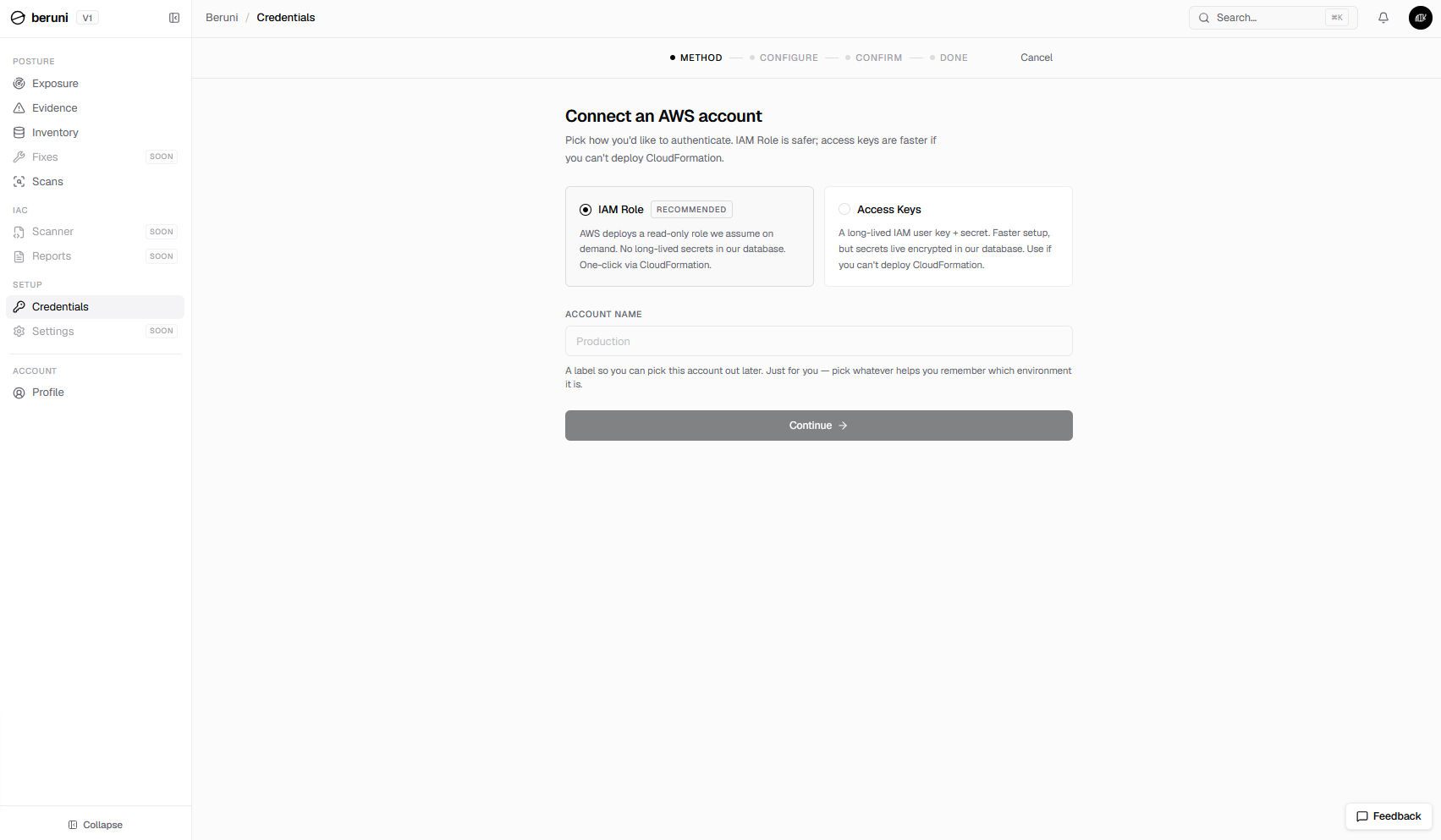
IAM Role, marked recommended, is what the rest of this post focuses on: AWS deploys a read-only role we assume on demand, and no secret of any kind lives in our database. Access Keys exists for the accounts where deploying a CloudFormation stack isn't an option, whether that's a permissions restriction, an internal change-approval process, or just wanting to connect a throwaway account in thirty seconds. It trades that convenience for a long-lived secret, which we tell you about in the same sentence we ask for it.
The one AWS permission Beruni's role grants
Whichever method you choose, the AWS-side permission grant is the same: one AWS managed policy, SecurityAudit. With IAM Role, CloudFormation attaches it to the role it creates. With Access Keys, the IAM user you create is expected to carry the same policy and nothing more, our setup screen says so explicitly. This is not a Beruni-authored policy. It's published and maintained by AWS, designed specifically for security and compliance auditing tools, and it's the same policy auditors, MSSPs, and most CSPM vendors ask for when they want read access to an account.
SecurityAudit's action pattern is consistent across every service it touches:
{
  "Effect": "Allow",
  "Action": [
    "iam:Get*",
    "iam:List*",
    "iam:GenerateCredentialReport",
    "s3:GetBucketPolicy",
    "s3:GetBucketAcl",
    "s3:GetEncryptionConfiguration",
    "s3:GetBucketPublicAccessBlock",
    "ec2:Describe*",
    "ec2:GetEbsEncryptionByDefault",
    "rds:Describe*",
    "rds:ListTagsForResource"
  ],
  "Resource": "*"
}
That's a representative slice, not the full policy (the real one runs to hundreds of actions across dozens of services). The pattern holds throughout: every action either lists resources, describes their configuration, or gets a specific attribute. There is no statement anywhere in SecurityAudit that creates, modifies, or deletes anything.
Beruni's scanner uses this access to walk five services: IAM, S3, EC2, VPC, and RDS. It calls the relevant List*/Describe*/Get* actions for those five, evaluates the responses against our open rule library (every check is a JSON file you can read on the landing page), and writes findings. It never calls a write action, because the role it's running under doesn't have one to call.
Why SecurityAudit, not a narrower custom policy
The honest objection here is the right one: SecurityAudit grants read access well beyond the five services we currently scan. If we only check IAM, S3, EC2, VPC, and RDS, why not hand us a custom policy scoped to exactly those five and nothing else?
We thought about it, and decided against it, for three reasons:
- A custom policy drifts; a managed one doesn't. AWS adds new resource types and new sub-actions to its services constantly. A hand-written policy needs someone to notice and update it every time AWS ships something new in IAM, S3, EC2, VPC, or RDS.
SecurityAuditis maintained by AWS itself, and we inherit that maintenance for free. We'd rather our role be exactly as current as AWS's own auditing policy than rely on us remembering to update a YAML file. - It's already in your security team's vocabulary.
SecurityAuditis the policy AWS recommends for read-only auditing, the one most security teams already recognize and have evaluated before, and frequently the one already permitted by existing IAM boundary policies. A bespokeBeruni-ScannerPolicy-v3is a new artifact someone has to review from scratch. A request forSecurityAuditis a request your team has likely seen attached to some other tool already. - The extra read access carries no exploitable surface. Read access to a service we don't evaluate isn't latent risk waiting to activate; it's access we simply never call. Our scanner code only invokes the API calls for the five services it checks. There's no code path that reads, stores, or forwards data from any other service, because we never wrote one. If that's not enough on its own, the next section is the part that actually does the protecting.
The boundary that actually protects you: the trust policy
This section is specific to the IAM Role method (Access Keys has a different, simpler boundary, covered below). The permission policy decides what the role can do once assumed. The trust policy decides who can assume it at all, and that's the control worth reading closely.
The CloudFormation stack, named BeruniRole by default, creates a role (its output ARN is typically named BeruniReadOnly) that trusts exactly one principal: Beruni's own scanner role in Beruni's AWS account, and only when the AssumeRole call includes the ExternalId generated uniquely for your account. Beruni's own setup screen shows this trust policy in full, for anyone who'd rather paste it in manually than use the one-click launch:
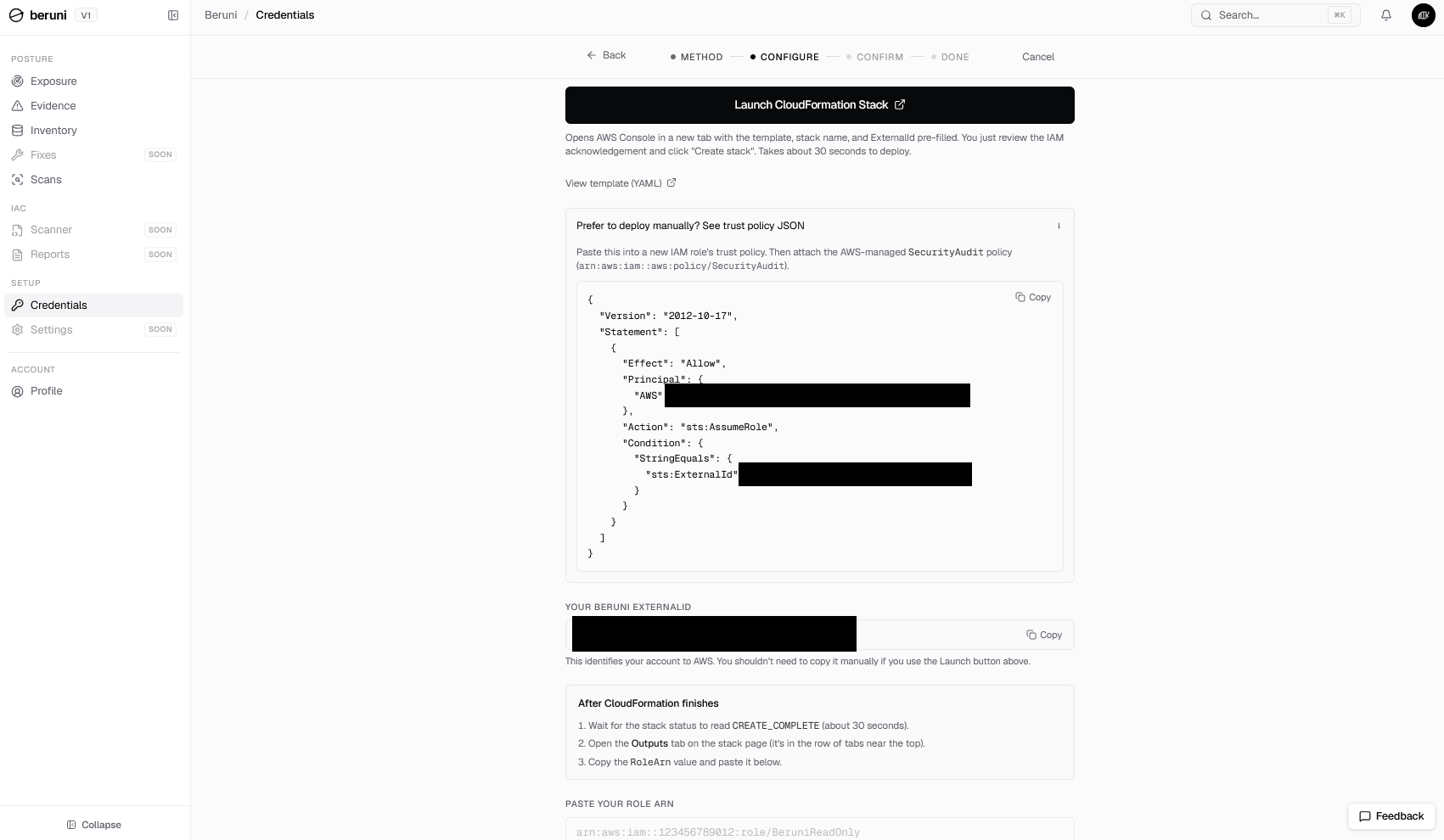
The trust policy itself, if you deploy it manually instead of through the one-click launch:
{
  "Version": "2012-10-17",
  "Statement": [
    {
      "Effect": "Allow",
      "Principal": {
        "AWS": "arn:aws:iam::<BERUNI_AWS_ACCOUNT_ID>:role/BeruniScannerRole"
      },
      "Action": "sts:AssumeRole",
      "Condition": {
        "StringEquals": {
          "sts:ExternalId": "your-unique-external-id"
        }
      }
    }
  ]
}
Two things matter about that Condition block:
- It isn't "trust our whole AWS account." The
Principalis one specific role ARN in our infrastructure, not a wildcard, not our account root. Compromising some unrelated resource in Beruni's AWS account doesn't grant access to your role; only that one scanner role can even attempt the assume, and only with the rightExternalId. - The
ExternalIdis the actual kill switch. This is the standard AWS pattern for the confused-deputy problem in cross-account roles, and it cuts both ways: we can't assume your role without yourExternalId, and you can revoke us without contacting anyone. Rotate theExternalId(or delete the role, or delete the CloudFormation stack entirely) and the very next scan attempt fails at theAssumeRolecall. No off-boarding ticket, no email to support, no waiting on us to process anything on our end.
The IAM Role credential lifecycle: no long-lived keys
There's a second question buried inside "what permissions does Beruni need," which is "what does Beruni hold onto between scans." For the IAM Role method, the answer is nothing.
The credential lifecycle for every scan is the same four steps:
- Your CloudFormation stack creates the role, with the trust and permission policies above.
- Beruni's scanner calls
sts:AssumeRoleagainst your role ARN, passing yourExternalId. - AWS issues a temporary session: a set of credentials with a short, AWS-enforced expiry, not a standing credential.
- The scanner uses that session to call the
List*/Describe*/Get*actions for IAM, S3, EC2, VPC, and RDS, writes findings, and the session expires.
We never ask for, store, or see an AWS access key or secret key belonging to your account through this path. There's no IAM user, no static credential, no service-account JSON file to rotate or leak. If our infrastructure were compromised tomorrow, an attacker connected this way would find session tokens that had already expired, not standing access to your account.
That guarantee is specific to IAM Role. If you connected with Access Keys instead, the picture is different, and worth describing just as plainly.
The Access Keys path: the trade-off, in the open
Some accounts can't deploy CloudFormation: a permissions boundary that blocks iam:CreateRole, an internal change-approval process that doesn't fit a thirty-second onboarding flow, or a team that just wants to connect a sandbox account quickly. For those cases, Beruni offers a second method, and we'd rather describe its trade-off accurately than pretend it doesn't exist.
With Access Keys, you create an IAM user yourself, attach the same SecurityAudit policy, and paste its access key ID and secret into Beruni:
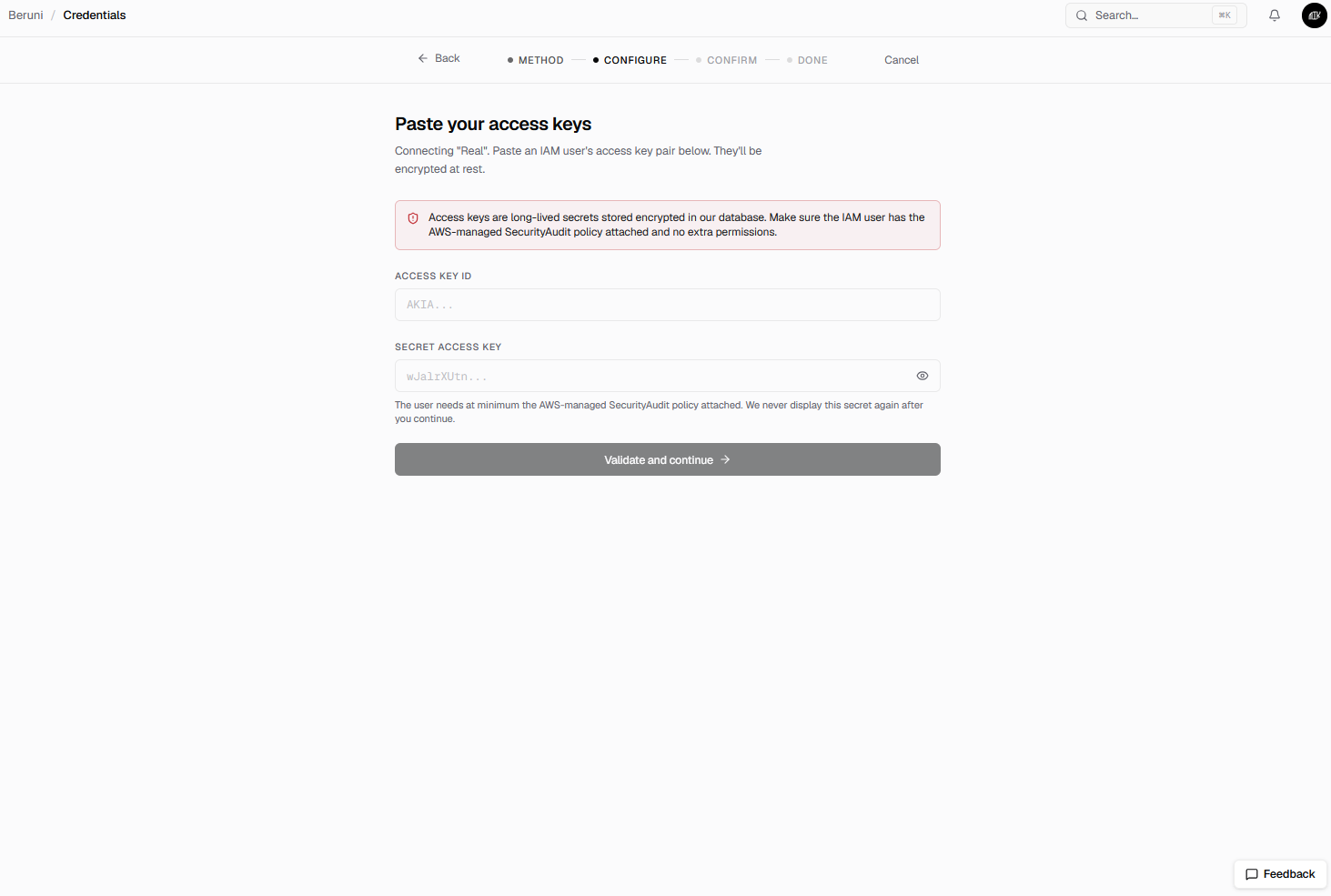
The screen says it directly: "Access keys are long-lived secrets stored encrypted in our database." That's a meaningfully different posture from IAM Role, and the mitigations are different too:
- The permission boundary is identical. The IAM user is expected to carry
SecurityAuditand nothing more, the same read-only, no-write policy the IAM Role method uses. A compromised access key under this policy still can't write, modify, or delete anything in your account. - It's encrypted at rest, not stored as plaintext. The secret lives in our database encrypted, not in a config file or a log line.
- We never show it to you again. Once you submit the secret, the UI never redisplays it, the same one-time-reveal pattern AWS's own console uses when it generates a key.
- It's a static secret, which IAM Role's session tokens are not. A leaked access key is valid until someone rotates or deletes it. A leaked STS session token from the IAM Role path expires on its own, on AWS's clock, whether or not anyone notices the leak. That difference is the entire reason IAM Role is the one marked recommended.
If your security posture requires avoiding long-lived secrets entirely, IAM Role is the only one of the two methods that gets you there. Access Keys is a deliberate, fully disclosed trade-off for the accounts that need it, not a hidden fallback.
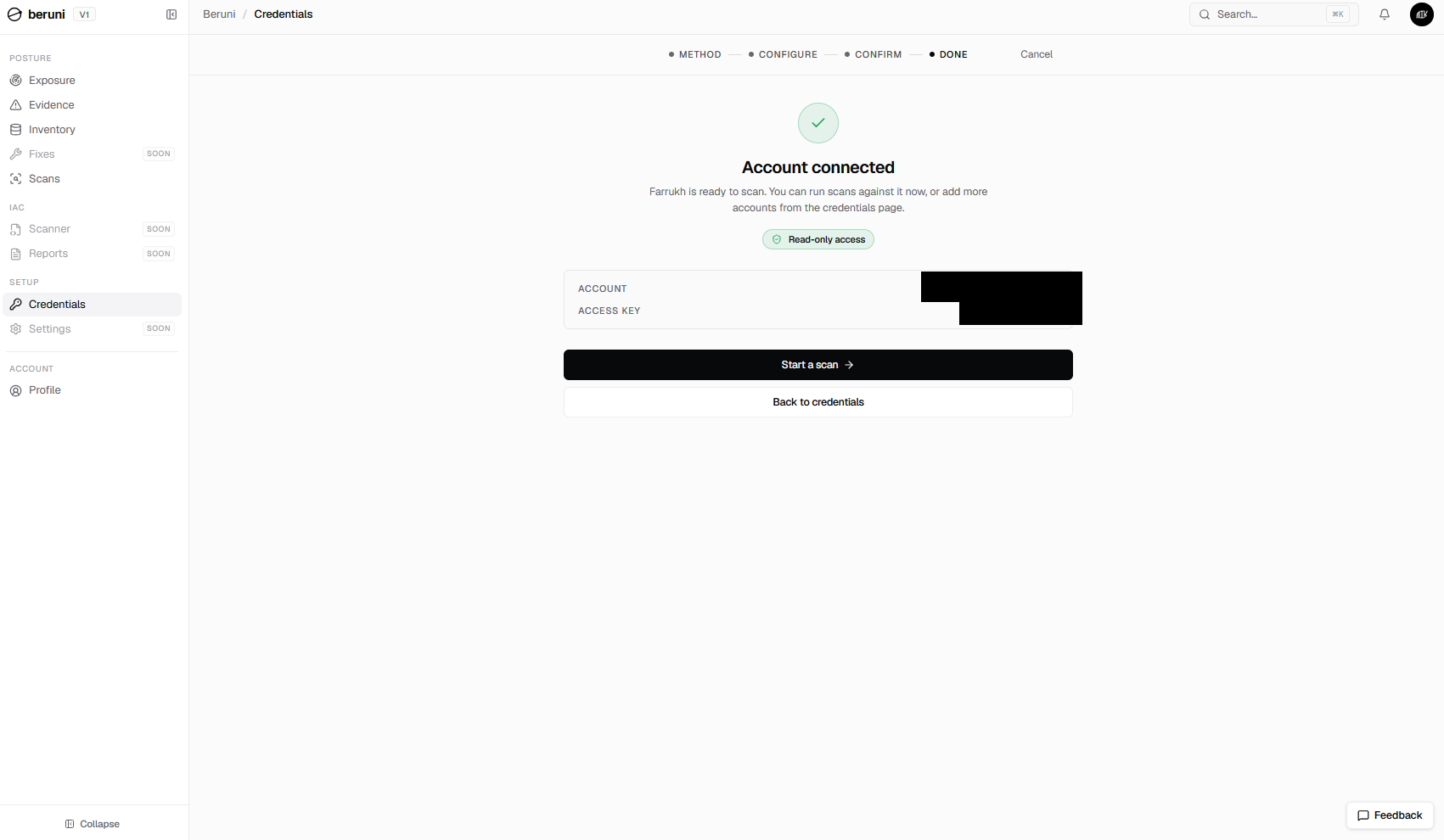
Once connected, the only thing that distinguishes an Access Keys account in Beruni's console from an IAM Role one is which field shows up in the confirmation screen:
What's deployed in your account: one role, nothing else
It's worth being explicit about what Beruni does not create, because "we connect to your AWS account" means very different things depending on what that involves.
There is no Lambda function, no EventBridge rule, no S3 bucket, no VPC endpoint, no security group, and no agent running on any of your instances, regardless of which connection method you use. With IAM Role, the CloudFormation stack's only resource is the IAM role itself. With Access Keys, Beruni creates nothing on the AWS side at all; you create the IAM user yourself. The scanner runs entirely on Beruni's infrastructure and calls into your account over the AWS API, the same way the AWS CLI on your laptop would.
Check it yourself
Everything above is checkable against the actual role or user in your own account, with the AWS CLI you already have.
If you connected with IAM Role, confirm the attached policy is exactly SecurityAudit, with nothing else stacked on top (substitute the role name from your stack's RoleArn output, BeruniReadOnly by default):
aws iam list-attached-role-policies --role-name BeruniReadOnly
aws iam list-role-policies --role-name BeruniReadOnly
The first command should return one managed policy: arn:aws:iam::aws:policy/SecurityAudit. The second, listing any inline policies, should return an empty list. If you ever see a second attached policy or a non-empty inline policy you didn't add yourself, that's worth asking us about directly.
Confirm the trust policy is pinned to Beruni's scanner role and your ExternalId, not a wildcard:
aws iam get-role --role-name BeruniReadOnly --query 'Role.AssumeRolePolicyDocument'You're looking for a single statement, one Principal.AWS ARN, and a Condition.StringEquals on sts:ExternalId. No "Principal": "*", no missing Condition.
Confirm the session length the role allows:
aws iam get-role --role-name BeruniReadOnly --query 'Role.MaxSessionDuration'That should return 3600, one hour. AWS enforces this ceiling at the AssumeRole call itself, not as a suggestion we could override, so any session token from one of our scans is dead within an hour regardless of when anyone notices a leak.
If you connected with Access Keys, confirm the IAM user you created carries SecurityAudit and nothing else:
aws iam list-attached-user-policies --user-name your-beruni-scanner-user
aws iam list-user-policies --user-name your-beruni-scanner-user
Same expectation: one managed policy, SecurityAudit, and an empty inline-policy list.
How to revoke access
If you connected with IAM Role, three ways, in order of how fast each one takes effect:
- Rotate the
ExternalId. Update the role's trust policy with a new value. Our nextAssumeRolecall fails immediately; nothing else in your account changes. - Delete the role. Removes the access path entirely. Beruni's next scheduled scan fails to assume the role and the account shows as disconnected in the console.
- Delete the CloudFormation stack. Cleans up the role and any stack metadata in one action. This is the one we recommend if you're offboarding entirely.
If you connected with Access Keys, revocation is an IAM operation on the key itself, not on us:
aws iam update-access-key --access-key-id AKIA... --status Inactive --user-name your-beruni-scanner-user
aws iam delete-access-key --access-key-id AKIA... --user-name your-beruni-scanner-user
Deactivating or deleting the key in IAM stops our next scan attempt cold, the same way rotating an ExternalId does for the IAM Role path. Remove the connection from Beruni's Credentials page afterward so the account doesn't sit there showing as disconnected.
None of these require contacting us first. They're IAM operations on a role or user in your account; you've always had the access to do them.
Frequently asked questions
Is Beruni safe to connect to my AWS account?
Whichever connection method you choose, the AWS permission grant is read-only: SecurityAudit, List*/Describe*/Get* only, on IAM, S3, EC2, VPC, and RDS. Nothing can be created, modified, or deleted, in those five services or any other. The recommended method, IAM Role, stores no secret on our side at all, only short-lived STS session tokens scoped by your account's unique ExternalId. The fallback method, Access Keys, does involve a long-lived secret, which is stated plainly on the screen where you enter it, encrypted at rest, and never displayed again. You can verify the permission grant against the actual role or user in your account with the AWS CLI commands above before you ever rely on our word for it.
Can Beruni write to or modify anything in my AWS account?
No, regardless of connection method. The SecurityAudit managed policy contains no Put*, Create*, Delete*, Attach*, Modify*, or similar write actions, on any service. Every action in the policy is a List, Describe, or Get call. There's no code path in our scanner that calls a write action, because the credentials it runs under, role-assumed or access-key, can't perform one even if it tried.
Why does the SecurityAudit policy cover more services than the five Beruni scans?
Because it's a single AWS-maintained policy designed for general security auditing, not something we wrote ourselves and could narrow at will. We use it instead of a custom policy because AWS keeps it current as new services and actions ship, and because it's a policy security teams already recognize. The extra read access it grants for services outside IAM, S3, EC2, VPC, and RDS is never used: our scanner only calls the API actions for the five services it evaluates.
Does Beruni store our AWS access keys?
Only if you choose the Access Keys connection method instead of the recommended IAM Role method. In that case, yes: the access key ID and secret are stored encrypted at rest, and our setup screen says so directly before you submit them. If you use IAM Role instead, no static credential is ever requested, received, or held; we use sts:AssumeRole, scoped by your ExternalId, to get a short-lived session token for each scan.
How do I revoke Beruni's access?
Depends on the connection method. For IAM Role: rotate the ExternalId on the role's trust policy, delete the role, or delete the CloudFormation stack. For Access Keys: deactivate or delete the access key in IAM. Any of these stops us cold on the next scan attempt, and none of them require contacting us first.
What if I need a custom policy narrower than SecurityAudit?
Tell us during onboarding. Beta onboarding is a call with two engineers, not a ticket queue, and we'll work through whether a scoped-down policy still covers everything our current rule library checks against IAM, S3, EC2, VPC, and RDS.
Does Beruni deploy anything else into my account besides the IAM role?
No, in either connection method. With IAM Role, the CloudFormation stack's only resource is the role itself: its trust policy and the attached SecurityAudit managed policy. With Access Keys, Beruni deploys nothing at all; you create the IAM user yourself. No Lambda, no EventBridge rule, no S3 bucket, no agent, no networking changes, in either case.
Where does the scan actually run?
On Beruni's own infrastructure. The scanner calls into your account over the AWS API, via sts:AssumeRole for the IAM Role method or directly with the stored access key for the Access Keys method, the same mechanism the AWS CLI uses, and nothing runs inside your VPC or on your instances.
What's the difference between IAM Role and Access Keys?
The AWS permissions granted are identical: SecurityAudit, read-only, on the same five services. The difference is entirely about credential lifetime and storage. IAM Role uses AWS's own cross-account assume-role mechanism, so no secret exists on our side between scans; it's the option marked recommended on our connection screen. Access Keys uses a long-lived IAM user key, stored encrypted at rest on our side, for accounts that can't deploy the CloudFormation stack IAM Role requires.
Beruni runs a hosted read-only scan across IAM, S3, EC2, VPC, and RDS against CIS, FSBP, PCI, and GDPR controls, under exactly the permissions described in this post. Closed beta, free, invite-only. Ask for an invite.